
Tenant Administrators have the option to disable Username/Password Login authentication on the Documoto login page at the User Group level so that users who are required to login via SSO are unable to bypass the SSO flow.
When a user is in a user group with "Disable Username/Password Login" enabled they are prevented from authenticating if they click the "Login" button even if they've entered a valid username/password.
Enabling this User Group setting requires a working SSO configuration. If SSO is not set up, affected users will lose access to Documoto. Do not, for any reason, enable this setting if there is no SSO configuration‼️
How to Disable Username/Password Login
In the Admin Center...
- Go to Users > User Groups
- Select the User Group that you wish to enable the setting for
- In the "Other" column, click the checkbox next to Disable Username/Password Login
- Click Save
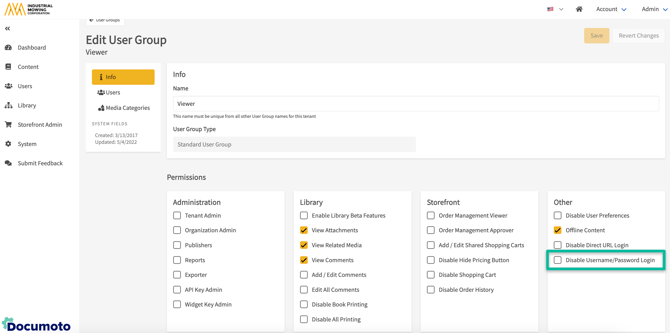
If a User belongs to multiple User Groups, the most restrictive setting applies.
For more information on User Groups, please see this Knowledge Base Article: How to Create and Manage User Groups