
Significant improvements are coming to the Library Parts Book experience during our February 4th, 2026 release!
This release introduces a more intuitive Parts Book Table of Contents (“TOC”) and Parts List or BOM navigation, search and filtering user experience. These enhancements are designed to:
- Make it faster and easier for users to navigate Parts Books
- Understand important context
- Find the parts they need with confidence
Article Topics
Why We're Making These Changes (Based on End User Feedback)
In the current experience, searching within the Parts Book TOC could sometimes lead to confusing results and a jarring user experience flow. For example, a user browsing a chapter like “Hydraulic Assembly” who searched for “Bolt” could be redirected to the first match anywhere in the book, which might be in a completely different section, such as “Cab Assembly”. This unexpected navigation caused unnecessary context switching and made it harder for users to stay focused on the machine section assembly they were working on.
We also heard that many users struggled to find the TOC itself, since it was accessed through a button at the top left. Combined with unpredictable search behavior, TOC search became a feature many users stopped relying on altogether.
This release is designed to solve these pain points by making the TOC easier to access, keeping search results contextual, and putting users in control of when the book view changes.
While these updates enhance Parts Book usability, they will also introduce changes to some existing workflows and behavior.
Please review the highlights below to prepare your teams and users accordingly.
Release Details – Documoto Production Environment
- Release Date and Time:
Targeted for Wednesday, February 4th at 7 PM MT / Thursday, February 5th at 1 AM UTC - Maintenance Window
The release will occur during a planned maintenance window of up to 2 hours. After successful deployment and validation, you will receive a "Maintenance Complete" email from our Status Page (expected within 2 hours of maintenance start).
What is New?
A User-Centric Redesigned & Pinned Parts Book Table of Contents
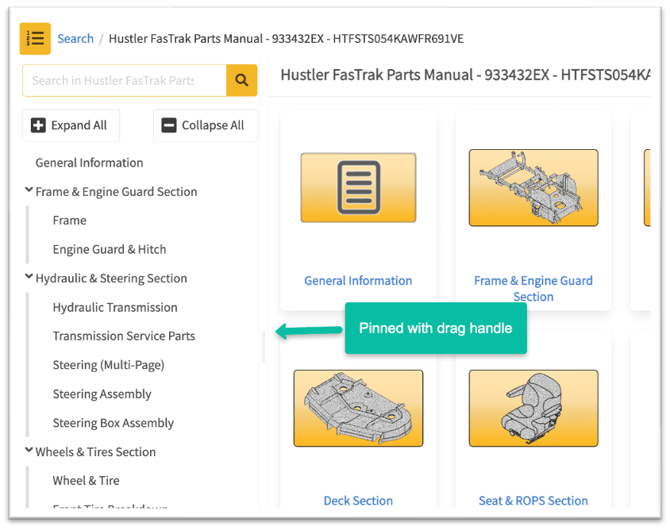
- The Parts Book TOC will be pinned to the left side of the screen by default on larger screen sizes and devices, with the Parts Book Viewer displayed on the right.
- The TOC will no longer overlay the Book Viewer.
- Users can resize the TOC to adjust the screen space or close it entirely if desired (open by default).
Contextual TOC and Page BOM Search
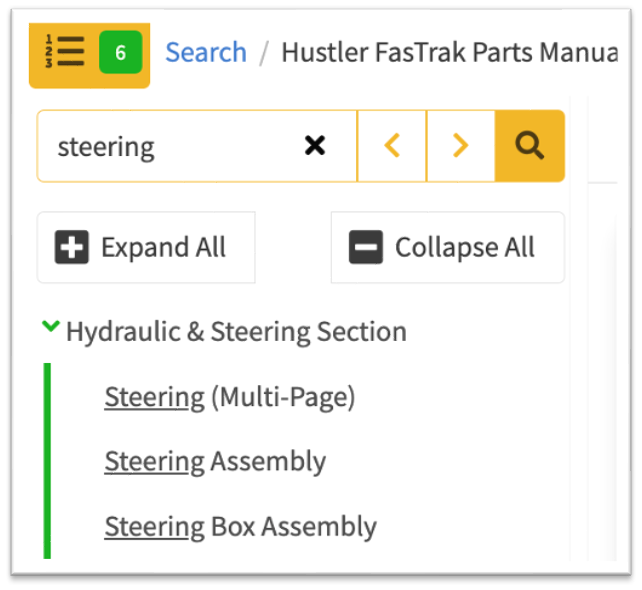
- When a user performs a search, the TOC dynamically filters to show only matching results.
- Non-matching results will be hidden until the search is cleared.
- For TOCs with chapters and sub-chapters, only matching items and their relevant TOC hierarchy are displayed.
Contextual TOC and Page BOM Search
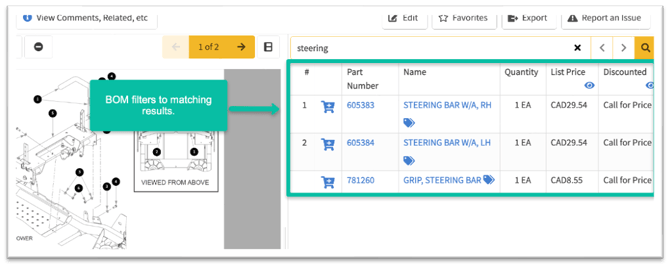
- When a search selects a TOC result, the search term will automatically apply to the Page BOM search as well.
Intentional Navigation Control
- When a user performs a search, the TOC no longer automatically navigates to first matching result, changeing the content displayed in the Book Viewer
- The Book Viewer updates only when a user explicitly clicks a TOC search result.
In-App Guidance for Users
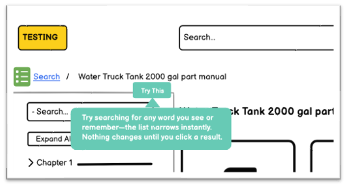
- A new “Try This” tooltip will appear in the TOC.
- The tooltip provides guidance such as: “Try searching for any word you see or remember. The list narrows instantly. Nothing changes until you click a result".
Integration Environment Preview
If you have an Integration environment, you will be able to preview these improvements soon. The Integration release is targeted for Tuesday, January 20.
Note: If you do not have an Integration environment, these improvements will be available in the Production environment on February 4th.
Enablement and Support
To ensure a smooth rollout, the Customer Success team will provide enablement resources, including:
- End-user enablement materials
- FAQ
- Knowledge Base articles highlighting what is new and how it helps
If you have questions or would like assistance reviewing the updates ahead of the February 4th release, please contact your Customer Success Manager or email support@documoto.com to request a meeting.